Training foundation models requires orchestrating hundreds or thousands of GPUs working in parallel. This article walks through the infrastructure, techniques, and practical steps for distributed training at scale.
How do you train foundational models with GPU clusters at scale?
What is multi-node GPU training?
Multi-node training distributes model training across multiple machines (nodes), each with multiple GPUs. Instead of training on a single 8-GPU server, you connect dozens — or hundreds — of nodes together, allowing you to train models with billions of parameters in reasonable timeframes. This involves partitioning the model and data across GPUs using parallelism strategies such as data parallelism, tensor and pipeline model parallelism, and parameter sharding, while coordinating execution across high-speed interconnects like NVLink and InfiniBand.
Why multi-node training matters
Foundation models have grown from billions to trillions of parameters. Training these models on a single node is impossible — the model won't fit in memory, and training would take months. Multi-node clusters compress training time from months to days or weeks, speeding up iteration cycles and time to market.
The shift to distributed training also means infrastructure becomes critical. Poor network configuration can bottleneck GPU utilization to 40-50%, meaning hardware failures in a 100-node cluster become routine events you have to handle without losing training progress. Getting distributed training right determines whether your model trains successfully, or burns through compute budget without results.
How distributed training works
- Parallelism strategies split work across GPUs. Data parallelism replicates the full model on each GPU and divides batches across them — simple but memory limited. Model parallelism splits the model itself across GPUs, enabling larger models but requiring careful coordination. Pipeline parallelism divides model layers into stages, processing different batches at different stages simultaneously. Most production training combines these approaches.
- Network interconnects move gradients and activations between GPUs. Within a node, NVLink provides 900 GB/s bandwidth between GPUs. Between nodes, InfiniBand or RoCE networks typically provide 400-800 Gb/s per node. Network latency and bandwidth directly impact training speed — every percentage point of network overhead is lost GPU utilization.
- Checkpointing and fault tolerance save training states periodically. In a 100-node cluster, hardware failures happen daily. Checkpointing every few hundred steps to distributed storage allows you to resume from the last save point. Modern frameworks support automatic checkpoint/resume with minimal code.
What you can do with multi-node training
- Train models that don't fit on single nodes: A 70B parameter model in mixed precision requires ~140GB just for weights. Add optimizer states and activations, and you need 400-600GB — far beyond single-node capacity.
- Reduce training time from months to days: Scaling from 8 to 128 GPUs can provide 12-15x speedup with proper tuning. A training run that would take 30 days on one node finishes in 2-3 days on a cluster.
- Iterate faster on model architecture: Shorter training cycles mean more experiments. Test different architectures, hyperparameters, or data mixtures without waiting weeks for results.
- Handle production-scale datasets: Loading and preprocessing TBs of training data requires distributed I/O. Multi-node clusters with parallel storage can sustain the throughput needed to keep GPUs fed.
Production example: Training Qwen2.5-72B
Training a 72B parameter model on B300 GPU clusters demonstrates real-world distributed training. Using 16 nodes with 8 B300 GPUs each (128 total GPUs):
- Model distributed across GPUs using tensor parallelism (TP=8) and pipeline parallelism (PP=2). The optimal configuration can vary depending on sequence length, batch size, and interconnect performance.
- Achieved 45-50% MFU (model flops utilization) with proper network tuning
- InfiniBand RDMA providing 6.4 TB/s aggregate bandwidth between nodes
- Checkpointing to distributed storage every 500 steps
- Training throughput: ~2,500 tokens/second/GPU
Common issues encountered include PCIe bus errors on individual GPUs causing node drops, NVLink connectivity failures requiring GPU resets, and network congestion during gradient synchronization requiring switch configuration tuning.
Getting started with multi-node training
- Verify your infrastructure: Test GPU-to-GPU bandwidth within nodes using
nvidia-smi nvlinkstatus checks and bandwidth tests. Verify inter-node network throughput withib_write_bwor similar tools. Ensure you're getting expected bandwidth before starting training. - Configure your distributed framework: Set up your training script with proper distributed initialization. For PyTorch: initialize process groups, set up NCCL backend for GPU communication, configure tensor/pipeline parallelism in your model. Test with a small model first.
- Implement checkpointing: Configure automatic checkpointing to distributed storage at an interval determined by iteration time and cluster reliability, balancing recovery time against checkpoint overhead. Test resume-from-checkpoint to verify you can recover from failures without data loss. Set up checkpoint cleanup to avoid filling storage.
- Run a scaling test: Start with 2 nodes, measure throughput and GPU utilization. Scale to 4, 8, 16 nodes, checking efficiency at each step. Target >80% scaling efficiency (doubling nodes should give >1.6x speedup). Debug bottlenecks before full-scale training.
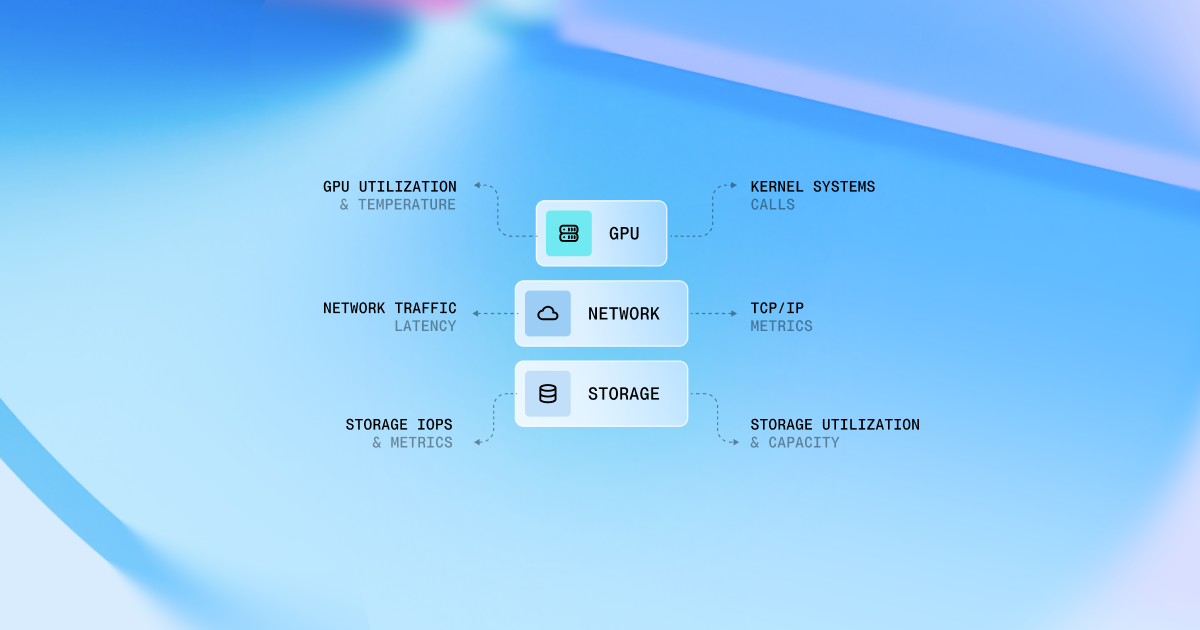
- Monitor your training run: Track GPU utilization, memory usage, and network bandwidth continuously. Set up alerts for node failures, GPU errors, or unusual metric drops. Be ready to restart from checkpoints when hardware fails.
FAQ
How do I know if my cluster is properly configured? Run synthetic benchmarks before training. Within-node GPU bandwidth should hit 800+ GB/s on NVLink. Inter-node bandwidth should reach 80%+ of your InfiniBand spec. If actual training runs show <70% GPU utilization with no obvious bottlenecks, check network configuration and storage I/O.
What causes most failures in multi-node training?
- Hardware issues: GPU memory errors, GPU fell off the bus, ECC & XID errors, PCIe bus failures, NVLink drops, GPU temperature/throttling
- Network issues: Congestion, misconfigured switches, RDMA problems
- Storage issues: Infiniband connection issues, mount and MTU misconfigurations, checkpoint writes timing out, metadata server overload, disk failures
- Software issues: Driver, VBIOS, Firmware incompatibilities, misconfigured NCCL
Should I use data parallelism or model parallelism? Start with data parallelism for models that fit in single-GPU memory — it's simpler and scales well. Use tensor/pipeline parallelism when models exceed GPU memory. Combine both for very large models: model parallelism within nodes, data parallelism across nodes.
.png)





.png)