Turning an open-weight model into a high-performing model for your task takes a sequence of well-measured experiments. Teams need to understand what the model will train on, follow how each run is progressing, adjust the training recipe, and identify which checkpoint performs best.
Today, we're expanding Together Fine-Tuning across that workflow. This release adds support for the latest open-weight models, live experiment tracking, finer controls over training and data processing, and lower prices on selected models.
You can also inspect and validate a dataset before training, compare runs while they are in flight, and stop when validation loss plateaus.
New models
New open-weight models are arriving at an unprecedented pace, with nearly every release raising the bar for quality, efficiency, or both. Teams want to bring these advances into production quickly, without spending weeks on the technical challenges of each new architecture.
For tasks that need frontier performance, you can turn to the largest and strongest models such as GLM-5.3 and Kimi K2.7. For example, GLM-5.3 scores 88.2 on Terminal-Bench 2.1, within one point of the leading proprietary models. Other teams prioritize performance and costs, choosing models such as Qwen 3.8-27B or Gemma 4. For local and on-device applications, the Qwen 3.5 family offers options ranging from 0.8B to 9B parameters.
Together Fine-Tuning supports all these models across a wide range of scales, with leading optimizations across systems and algorithms built in. Submit a training job, and we handle the architecture-specific complexity behind the scenes. The latest additions include:
- GLM 5.3
- GLM-5.2
- GLM-5.1
- DeepSeek-V4-Flash-0731
- DeepSeek-V4-Flash
- Kimi K2.7-Code
- Kimi K2.6
- Qwen 3.8-27B
- Qwen 3.6-35B-A3B
- Qwen 3.6-27B
- Qwen 3.5-27B
- Qwen 3.5-9B
- Qwen 3.5-4B
- Qwen 3.5-2B
- Qwen 3.5-0.8B
- Gemma 4-31B
- Gemma 4-26B-A4B
View the full list of supported models along with their context lengths in our documentation.
Experiment tracking
The sooner a run's trajectory is visible, the sooner the next decision can be made - adjust the data, change the hyperparameters, or let it finish. Fine-tuning jobs now record metrics at every training and evaluation step and expose them directly through the Together API, CLI, and UI dashboard. Metrics, job status, and artifacts stay in one place, so you can remain on the same platform for the entire journey of model development.
Every run captures the core training signals: loss, gradient norm, learning rate. When you add a validation set, the evaluation loss and metrics will be tracked alongside training metrics.
In the dashboard, every job gets a Metrics tab with curves that update while the run is still in flight - and you can select several jobs and chart them together on one set of axes, so a sweep reads as a single picture instead of a dozen browser tabs. You can also do the same via our Python SDK: one command, curve in the terminal, no context switch.
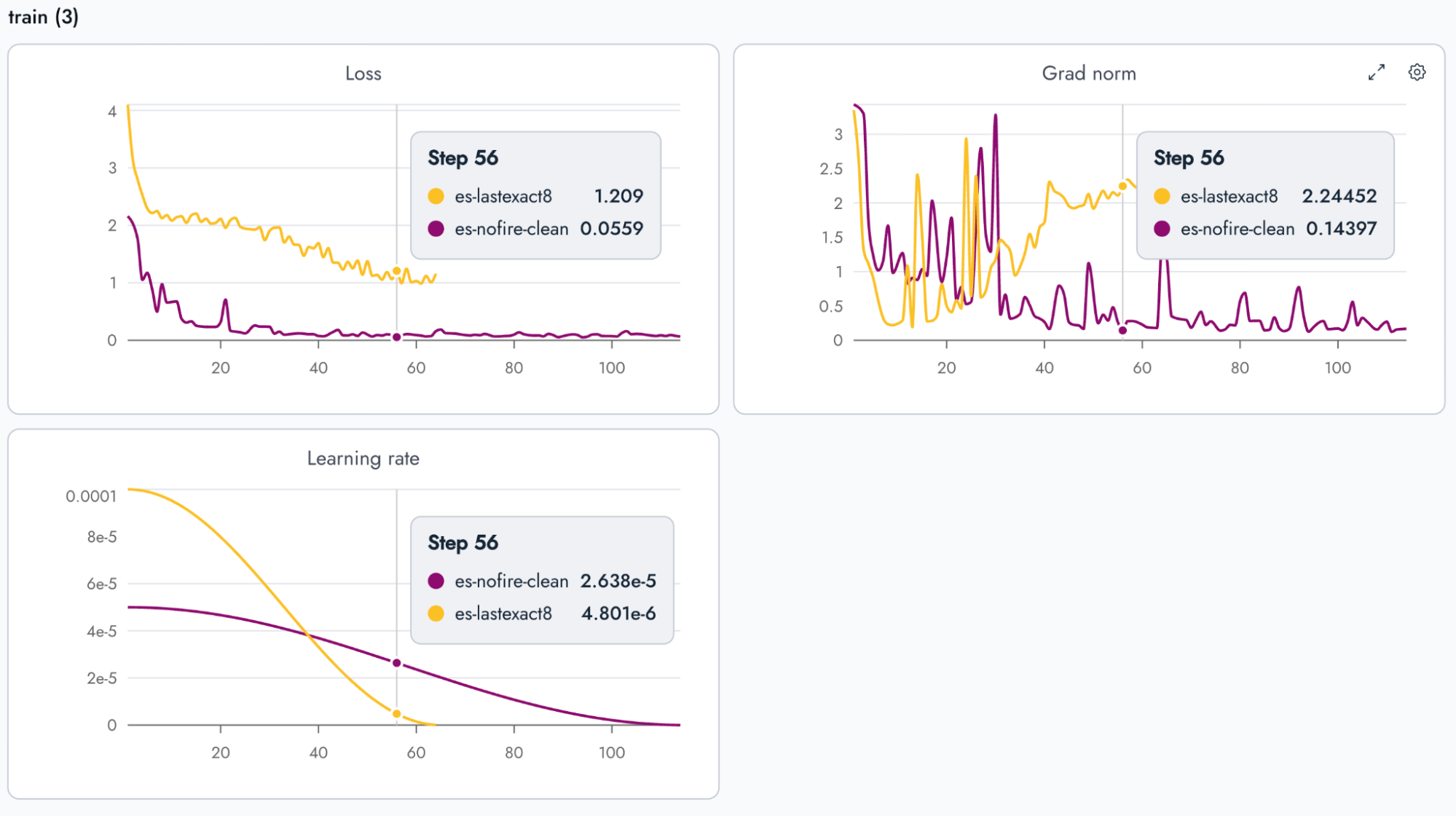
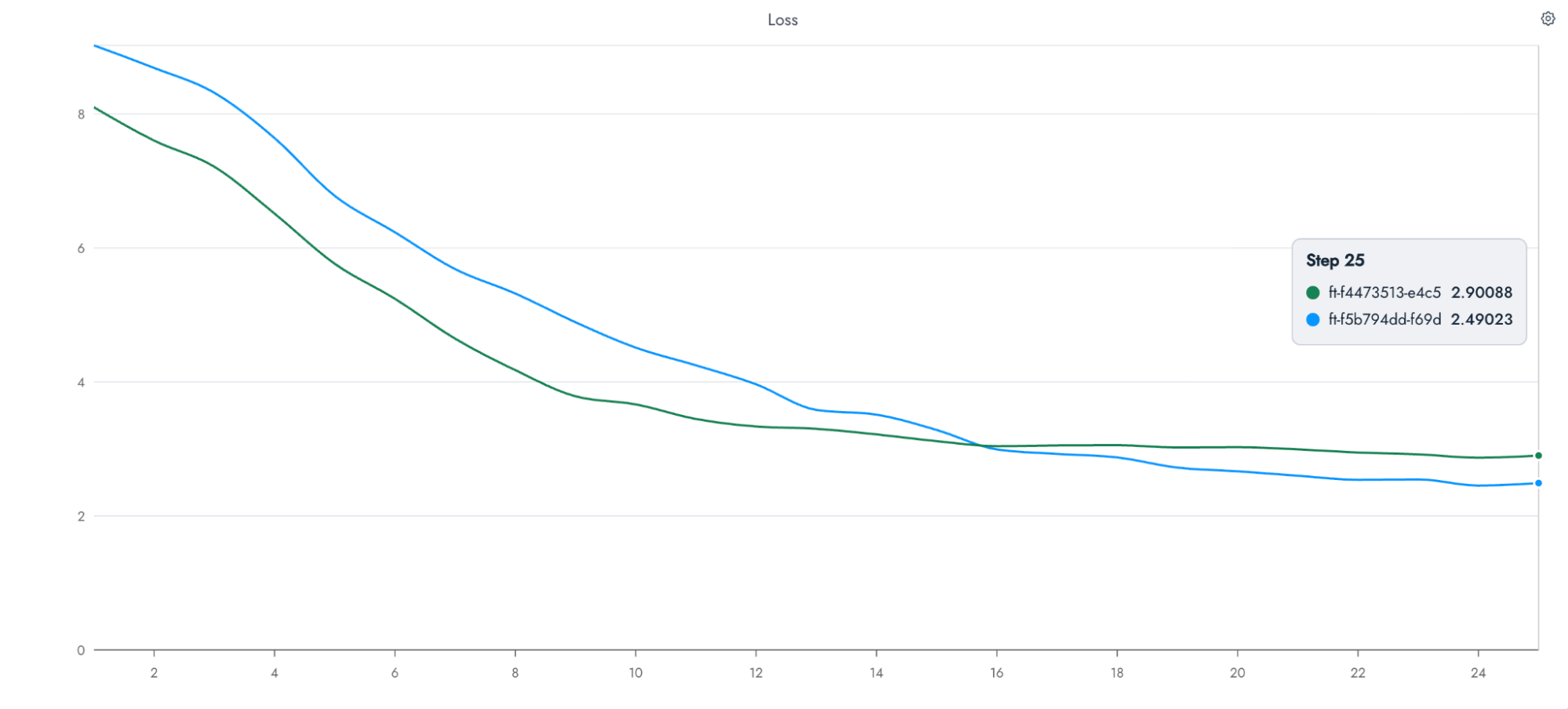
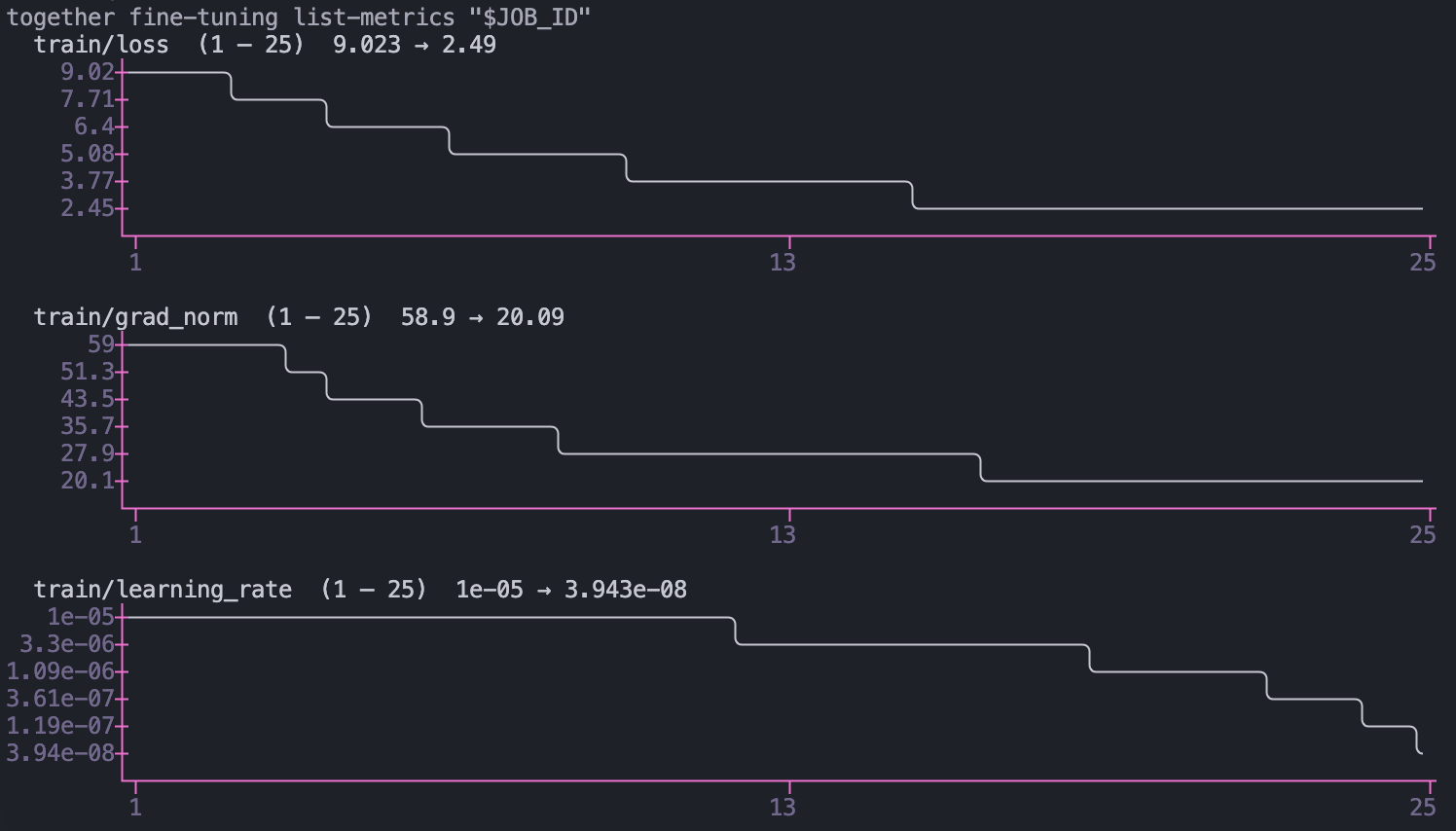
The API returns the underlying series - every recorded step, filtered by range or downsampled. This way, you can pull metrics into a notebook, your internal dashboards you already have, or any other destination.
See more details in our documentation.
More controls over training
Expert LoRA
In a Mixture-of-Experts model, over 90% of the parameters, and most of what the model actually knows, live in the expert layers. Standard LoRA fine-tuning never touches them: adapters attach to attention while the experts stay frozen. You can now put LoRA adapters on the experts themselves, so your job can train the layers where the knowledge lives.
The difference shows up wherever a task needs the model to learn something genuinely new. We taught models 200 invented facts (so the base models know none of them): adapters that include the expert layers recalled up to 89% of the new knowledge, while attention-only adapters topped out at 15% on the same model. They also kept more of the model's existing knowledge and won MMLU-Pro outright, 75.3% to 71.5%.
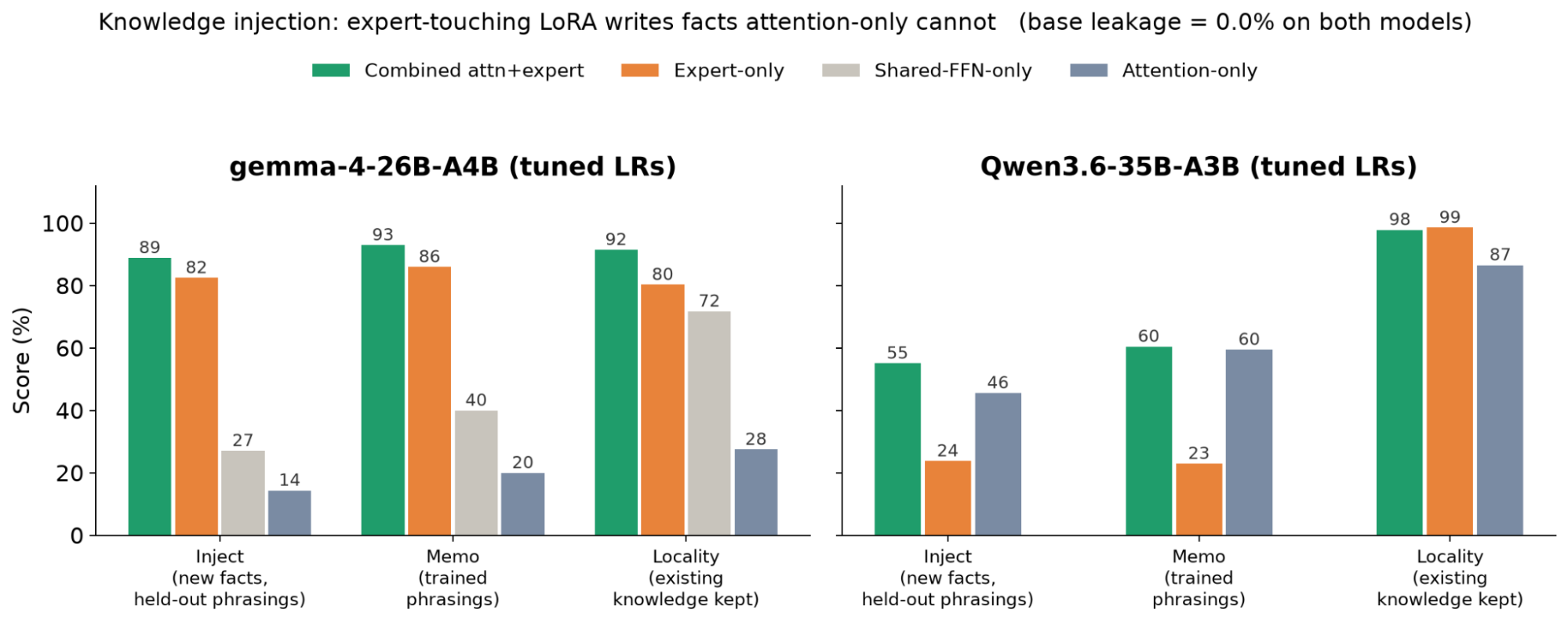
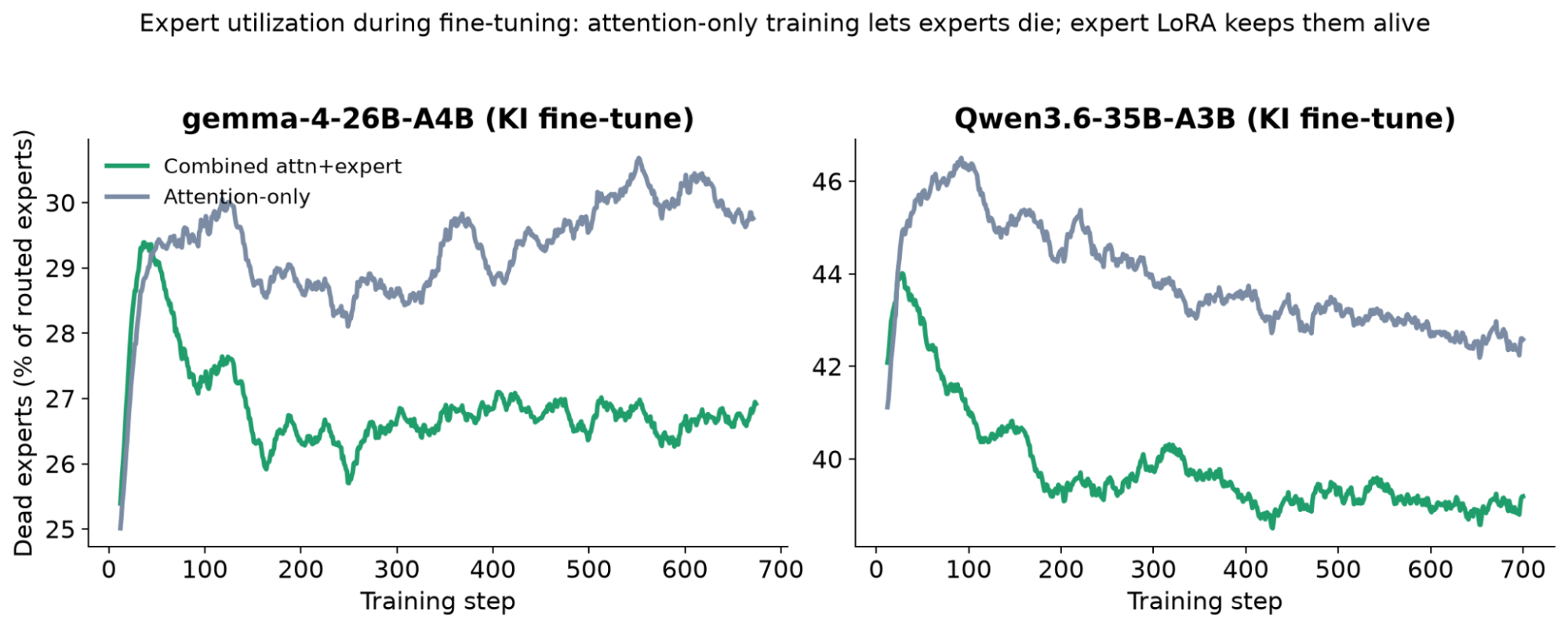
The training dynamics explain the gap: with attention-only adapters, a growing share of routed experts simply falls out of use during fine-tuning, while expert adapters keep the whole mixture engaged.
Enabling expert adapters is simple: just add the expert modules to lora_trainable_modules. The rest of the fine-tuning workflow remains the same as it does for any other LoRA job.
Early stopping
Fine-tuning jobs can now automatically finish when they stop improving. That means you get the best model, not just the last one, and you don't pay for training that no longer helps. Enable early stopping, provide a validation set, and we'll watch your validation loss at every evaluation. When the curve plateaus, we halt the run, keep the checkpoint with the best validation loss as your final model, and automatically refund every training step you didn't use.
Patience, sensitivity to small improvements, and warmup are all tunable when you want finer control. The full parameter reference is in the docs.
Arbitrary batch size support
Some jobs need batch sizes that can't fit in GPU memory: long sequences, large models or a recipe tuned for a big global batch. You can now train with whatever effective batch size you want regardless of what fits in a single pass. Set gradient_accumulation_steps and gradients accumulate across micro-batches before each optimizer update, giving an effective batch of batch_size x gradient_accumulation_steps. Details in the docs.
Price reductions
At Together, we believe that intelligence should be abundant, and we leverage all available systems and algorithmic optimizations to provide the most value to our customers. We continue optimizing our training stack and want to transfer any cost reductions to users. Hence, we are dropping the prices of training for most of the models we support, with savings starting from 30% and reaching 70% for models such as the gpt-oss series.
Here are some of the price changes for training LoRA adapters per 1 million tokens:
| Model | Old SFT | New SFT | Old DPO | New DPO |
|---|---|---|---|---|
| Qwen/Qwen3.5-9B | 0.48 | 0.34 | 1.20 | 0.84 |
| Qwen/Qwen3.8-27B | 1.50 | 1.05 | 3.75 | 2.62 |
| google/gemma-4-31B-it | 1.50 | 1.05 | 3.75 | 2.62 |
| openai/gpt-oss-120b | 5.00 | 2.50 | 12.50 | 6.25 |
| openai/gpt-oss-20b | 1.50 | 0.40 | 3.75 | 1.00 |
The full pricing table is available on our pricing page.
Case study: How Adaption automates training for open models up to 1T on Together
Adaption is a frontier AI research company building intelligence that continuously learns, evolving through live data and environments rather than static training and costly retraining cycles. Its research spans three pillars:
- Adaptive Data, which shapes data at scale
- Adaptive Intelligence, which evolves models across industries and languages
- Adaptive Interfaces, which reimagines human-AI interaction
AutoScientist, part of Adaptive Intelligence, automates the full research loop behind model training. Where Adaptive Data shapes the inputs, AutoScientist shapes the model itself: you set the outcome, and the loop searches training recipes, optimizes the data, trains, and evaluates, cycling through all four rather than defaulting to generic hyperparameters.
It refines its choices with every run until quality converges on your objective. It supports both LoRA and full fine-tuning across leading open models up to 1T parameters, with training powered by Together's fine-tuning platform and evaluation run on Together's dedicated endpoints. The result is a closed loop that keeps improving a model, without the manual effort or retraining costs that would otherwise demand it.
"We have partnered with Together to run Adaption's AutoScientist full self-improvement training loop at up to 1 trillion parameter models. It allows us to provide companies around the world with self-improving intelligence at scale with tooling that reliably delivers." - Sara Hooker, Co-founder, Adaption
Flexible and transparent data processing
Inspecting tokenized data
Previously, data processing ran as a black box inside fine-tuning jobs: you couldn't see how your data was tokenized and packed. When the result differed from what you expected - a chat template applied differently than you assumed, labels masked in the wrong places, rows silently truncated - you'd get a drop in quality that was hard to trace back to its cause.
You can now inspect the tokenized data before starting a job. Preview rows from any uploaded file, tokenized with the exact tokenizer and chat template of the base model you're about to fine-tune, and see exactly what training will consume: token IDs, token strings, per-token labels, the spans that contribute to the loss, and whether the row was truncated at the model's maximum sequence length. The preview runs in seconds.


You can also check what the training loop actually consumed. Every fine-tuning job now exposes a subset of its fully prepared dataset - tokenized, packed, and collated exactly as the trainer received it. It's available through the Python SDK and via the Download link on the job page in the console.
Learn more about dataset previews in the docs.
Sample weights
Not every training example deserves the same treatment. Modern datasets often blend multiple sources and domains - human-annotated data alongside synthetic, one domain alongside another - yet by default every example carries the same influence on training, regardless of quality or importance.
Together Fine-Tuning now supports per-example weighting allowing you to precisely control the impact of each data point. Add a weight field to any example in your JSONL file, and training scales that example's contribution to the loss accordingly. Weights work with every supported JSONL data format and every training method.
Read more about sample weights in our docs.
Pre-flight file validation
Dataset validation used to run inside the training job. If line 59,000 of your file had a malformed tool call, you found out after the job had queued, scheduled, and started - minutes of waiting to learn about a typo.
Now, a full server-side check kicks off as soon as your fine-tuning JSONL file finishes uploading, and the result lands on the file object itself, so you can see any issues before you even create a job. The checks cover the full schema: message structure and roles, tool definitions and tool-call/response pairing, reasoning fields, multimodal content and image decoding, preference-pair structure, and sample weight types and ranges - with the offending example index in the error message.
A successful validation also reports what we detected about your data - dataset format, line count, and whether it contains sample weights, message weights, tools, parallel tool calls, reasoning traces, or images - so you can confirm the platform read your dataset the way you meant it.
Read more about pre-flight file validations.
Packing controls
Sequence packing is a technique for concatenating multiple sequences into a single one to avoid wasted computation on padding tokens. It dramatically improves throughput and shortens training time, so it is enabled by default in Together Fine-Tuning. Despite its efficiency benefits, it isn't always the right choice: with a small dataset, packing can leave too few optimization steps per epoch.
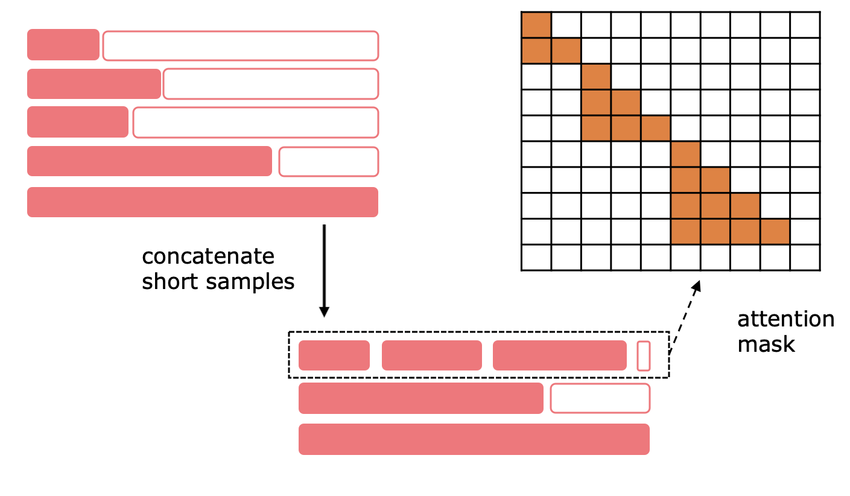
You can now fully control sequence packing: disable it entirely with a single flag, or use position_ids in the pre-tokenized data format to set the degree of packing you want.
For more information, read our docs.
Coming soon: a faster path from fine-tuning to inference
Every intermediate LoRA adapter will be deployable while fine-tuning is still in progress. Instead of waiting for the entire training job to finish, you'll be able to start evaluating results shortly after it begins, saving hours or even days per iteration. As soon as the first adapter is saved, you can deploy it through Dedicated Model Inference or attach it to an already running endpoint in a Multi-LoRA setup, avoiding the cost and startup time of a separate endpoint for every experiment.
Initial support is planned for GLM-5.3, followed by Kimi K3. We'll share availability details, the full list of supported models, and a complete API walkthrough as the new workflow approaches release.
Conclusion
Together Fine-Tuning now gives you more visibility and control over the full experiment cycle, from the data the model sees to the checkpoint you deploy. You can validate a dataset before a run, follow and compare metrics while it trains, and adjust the recipe with finer controls.
Support for the latest open-weight models and lower prices on selected models make that loop easier to repeat as new models arrive.

.png)
.png)